CARE Call FAQ
This section is an FAQ & Status reference sheet for Website Specialists on-call with a new/existing CARE customer.


On-Call FAQ
New CARE Customers
Ideally we want them to be empowered to do so but it is not required. When a CARE customer calls in, we should always be more than willing to help. Always default to screen sharing with them to teach them how to use the tool but if they decline and just want us to do it, that’s perfectly fine too. Just log into their customer account and process the ticket for them.
We should never be charging a CARE customer for anything update related. There is no cost for us entering the ticket for them or helping them through the portal, and there is also no charges for “out of scope”. Their build is complete so the customer can add as many pictures, products, pages, etc. as they want through CARE, but regarding plugins they have to stay in scope of what their plan is.
We walk the customer through setting up their website care and submitting a ticket.
If it is 72, double check how many changes they have before closing out the ticket and walking them through Care.
The customer gets only the functionality of their plan type that they purchase that are listed in our approved plugins list (I.E customer purchases STD they only get the Store Locator Plugin). In Care they do not get to add any plugin that is not a part of their plan type nor a 3rd party plugin.
If the customer has a word document already clearly written, you can just create one task and attach that document to send to the builder. If there are only a few tasks that the customer has not laid out in a document, please format the ticket to have one job per task.
Use WPUpdates@godaddy.com to receive the content and put in the ticket for the customer.
The answer is no. With the fast day turnaround we can always submit more tickets because they get unlimited requests, but ideally we want to work on getting all the changes done one at a time for less confusion on their website.
Existing CARE Customers
Anyone who answers the IB call can help the customer, there is no “dedicated” team. If you are not sure how to handle the call or what to do, please place the customer on hold and seek out a peer, team lead, or Manager for help.
The answer is no, the customer has 3 options for us:
- WSI submits it for them
- WSI walks the customer through submitting it
- WSI submits it for them through Zoom Share
Note: Self-serve is an option, not a requirement.
If the customer needs help putting in a request we can do it for them or show them how to do it.
See statuses key below for more information.
You can search for the customer’s existing requests here by shopper ID or email search.
Own the ticket, if the customer is on the phone giving the clarification you should go through the rest of the statuses and provide the clarification answers in Jira.
Cancel: if it is just 1 task in their whole ticket the WSI would add a note to the ticket in Jira
Cancel: if it is the whole ticket you would take ownership of the ticket hit “In Progress” and then hit “Cancel”
Edit: if it is still in status “open” put a note in the ticket to get it done, but if it is in any other status reach out to our Prod team via email.
Both in the New Build Workbench ticket, CRM, and in the Jira ticket. Click the “Add to CRM” check box in WorkBench so that it will add it to CRM. Currently there isn’t an option for Jira to add it automatically to CRM.
The customer gets a confirmation that ticket will be complete between 24-48 hours, but if the ticket is needs more time the Builder that is working on the ticket will open a clarification subtask ticket for the WSI to reach out to the customer to give the exact business days for the ticket.
You have to reply back to the customer in the “Website Care Request” Ticket. If the customer has a clarification, you would need to click “In Progress”, go to the “Website Care Request” (Parent ticket) and click on “Respond to Customer”
Screenshot of the “Website Care Request” and how to “Respond to Customer”

If you have search for the ticket in Jira and see nothing the customer might not have submitted the request properly. To check go to the customer’s MyA page and try to submit a new Care ticket. If you can submit a new ticket that means they might not have clicked “Done” and then “Submit Request”. Please fill out the ticket for the customer and submit for them if this is the case.
CARE Lifecycle Statuses
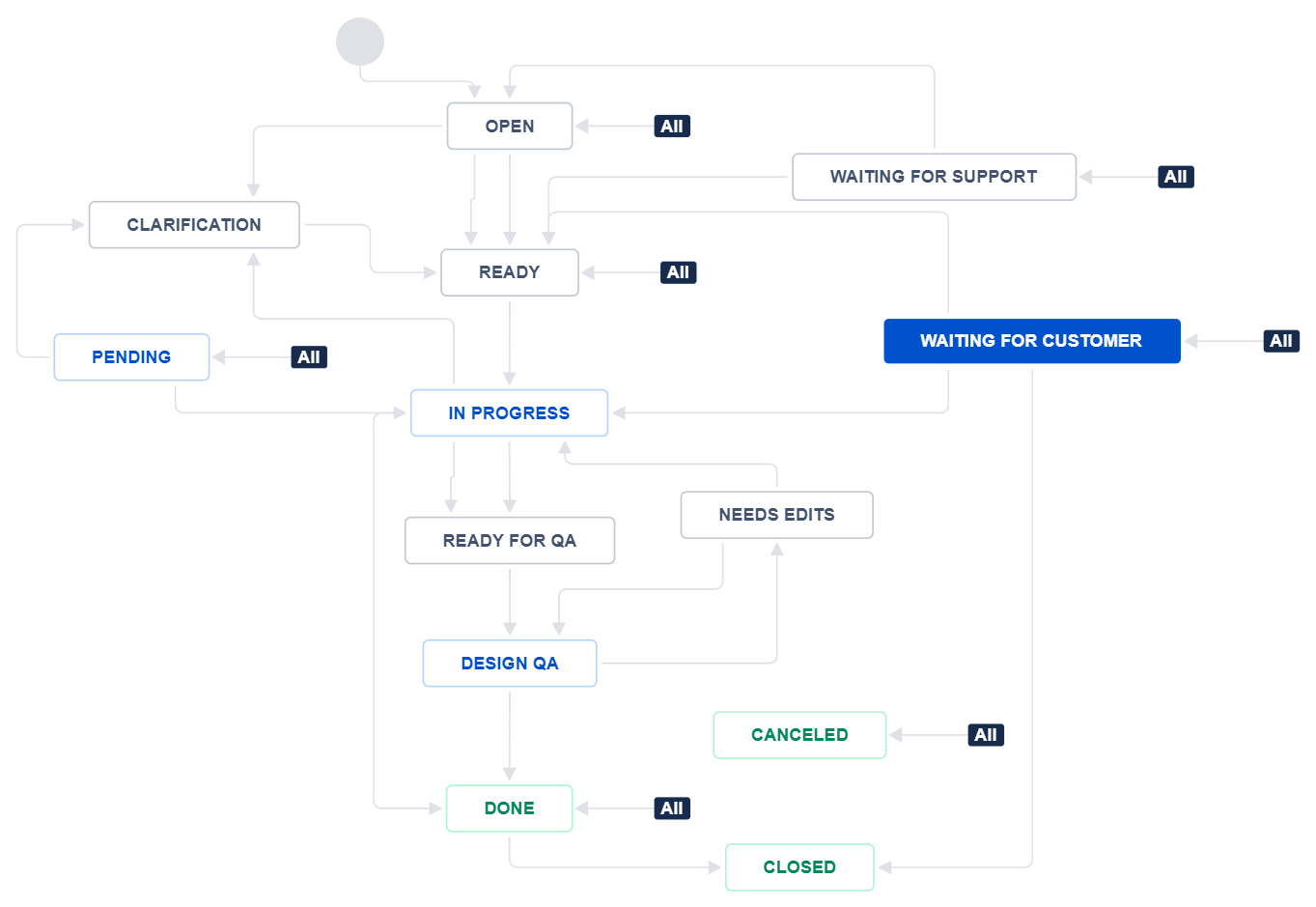
Statuses: Website Care Request
Open
Ready
In Progress
Clarification
Waiting for Customer
Waiting for Support
Pending
Ready for QA
Design QA
Needs Edits
Done
Canceled
Closed
Color Key:
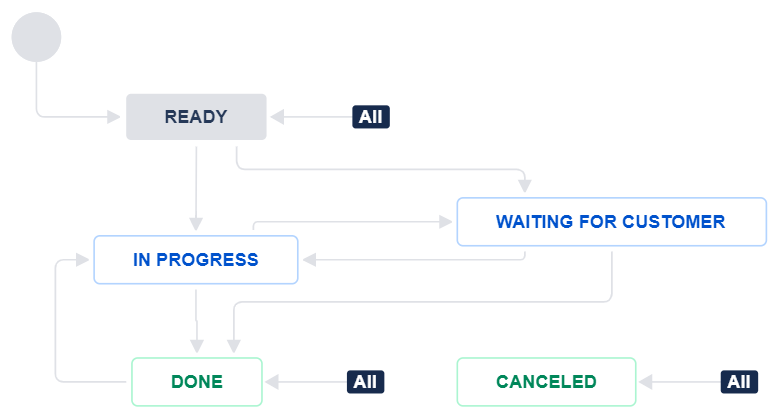
Statuses: Clarification Subtask
Ready
In Progress
Waiting for Customer
Done
Canceled
Color Key: