
Welcome

GoCentral OLS
WS Resource - Intake Form Side-by-Side
Don’t forget your call disclosure on outbound calls: “your call may be recorded and retained for quality and training purposes”
Validate Account Once you said the call disclosure, you need to have the customer validate in the GoDaddy account to proceed with the consultation.
Before launching screenshare, make sure you've disabled autofill from your brower settings!
Greet
"Thank you for taking the time to speak with me, I am very excited to be helping you with your website today! Welcome to our team!"
* Set timeframe for appointment
Details About The Company
"Why don’t we start with you telling me a bit about your business and what we are building for you..." (see tips)
Set Expectations
"This is going to be great! Before we get started with our design consultation I just wanted to let you know how this process works and what your plan includes. Once I review everything, if you have any questions or didn’t catch something, I’d be more than happy to review again or clarify for you."
Your Plan Includes: 7 Pages, 100 Product Configurables (SKUs/varients), 20 images + 1 image per product up to product allowance.

1. Design Consultation
To start we are going to do a design consultation. This should take us anywhere from 45-60 minutes and will help me get a better understanding of what we are going to create for you. I will need you to be in front of a computer so we can screen share.

2. Gather Content
At the end of our consult you will receive an email with the notes from the consultation. If there’s additional information we need for the initial build of the site I will include those items in the email and we can schedule a time for us to finalize your content.

3. Build Website
Once we have all your content, the initial build of your site can take up to 10 business days

4. Make Refinements
After you see your draft we will work together to gather any changes to finalize your website.
This can take up to 5 business days.
5. Then it’s time to Launch!
You will have FULL access to your site at any given time once the build is complete.
That’s not all though, once your site is built you have two options for having changes completed in the future:
- You will get access to our training portal to assist you with “do it yourself” changes to your new site (think of it like getting your keys to your new car).
- Care/Updates: Let customer know that they will have access to the request form online 24/7 post build OR if a customer without Care wants us to make updates we offer that service to PWS customers at $50/half hour.
Pulse Check
"Do you have any questions before we get started with the consultation?" --- Start Consultation!
Plan Specs
Plan Specs
Plan Includes | Process Scope | Time-frame Expectations

Plan Includes
Discuss Page Limitation, site components & other plan details (copy-writing is included)
Pages & Site Components:
| Site Element | GC OLS Scope |
|---|---|
| Pages | 7 -- (Home / 4Core / TOS / Contact) |
| Products | 100 product SKUs/variants (see below) *** |
| Images | 20 Images for the pages and 1 image per product up to 100 products |
| Form Fields | Can ONLY be added be added w/ contact module (14 fields MAX) |
| Online Appointments | We will set up to 20 services * not accommodations friendly (does not consider overnight) (Supports: United States, United Kingdom, Canada, and Australia) |
| Categories | 1 Category/Product (Single category creation for initial build) |
Other Plan Details:
| Site Extras | GC OLS Includes |
|---|---|
| Email Plan? |  -- (o365 Essentials) -- (o365 Essentials) |
| GEM Integration | |
| Maintenance? |  |
| SSL? | -- Auto Installs! |
| Content Writing | -- Included |
| Video Tutorials | -- (24/7 video access) |
| Free Domain | |
*** Products up to 100 product SKUs/variants, for example:
- customer has 100 products, no variants
- customer has 50 products with 2 variants (t-shirt X in red or green)
- customer has 20 products with 5 variants (t-shirt X in red, green, blue, pink, & purple)
*** Product options platform limitations for GCOLS:
- Customers can only include up to 3 option tiers per product (e.g.: T-Shirt A can include options for Size, Color, & Fabric but no more)
- Customers can only have 100 option choices (known as "option values") for all products storewide (see more details HERE)
Time-frame Expectations
Discuss Initial Build Time-frame: GoCentral Online Store - Your site can take up to 10 business days
Discuss Revisions Time-frame: Your plan includes a round of revisions, the timeframe for completion is 5 business days
| Build Type | Time-frame for Completion |
|---|---|
| New/Initial Build | Your site can take up to 10 business days |
| Revisions | All Revisions take 5 business days |
After-build Expectations
Discuss ability to purchase Update Minutes after build is complete: $100/hour
*Minutes are not a la carte, and are purchased in 30-minute increments of $50.00 per every 30 minutes.
Discuss Training Hub:
After your website is complete, you’ll have access to our online training hub, which includes video tutorials, training resources, and FAQ sheets about your new site. (view helpful tips)
Advise customer that they are able to access their site after build.
Any future changes can take up to 5 business days depending on how extensive the request is.
Pulse Check:
"Do you have any questions about any of the expectations that we just went over?
Let's start screen-sharing!"
The Basics

The Basics
About You | About Your Company | Business Contact Info
Details About The Business
Brief Description:
This should be a very short description of the site, around 320 characters or less, that summarizes your business. What would you want to see in the search results if you searched for your business online?
What is your mission/vision?:
A simple sentence stating the main goal of the company. Why you do what you do and what are you trying to accomplish.
For example: "Our company aims to _____ which improves _____ for our customers."
Local Areas You Serve:
Recognizable cities/towns that are within the local range of your services. If you're an online store, mention the areas you ship to. If you're not sure, if you have no specific areas, or if it simply doesn't apply, leave it blank.
What sets you apart from your competition?
Why should customers pick you over someone else in the same industry? What makes you stand out? This is important to put somewhere immediate on the site that catches a visitor's attention if they were skimming through businesses in the same category.
Pulse Check:
Do you have any questions before we get into the design portion of our consultation?
Branding

Branding
Logo | Choosing a Color | Choosing a Font
Logo
If you have a logo:
Provide us with the high quality logo image in .png, .jpg, .pdf, .psd, .ai or .eps format.
If it's a low quality image logo, and if it has a white background that we cannot easily remove, then it will affect how it looks on the header you choose. If your logo image is too small for us to correctly remove the background from, and you are looking for a transparent/translucent header type, maybe we could use your business name in text for now and you can have us update the logo when you get one.
If you don't have a logo:
If you don't have a logo yet and are looking to have one made, we offer a logo design service and we can point you in that direction. Until then, we can use your business name text in place of the logo image.
Theme Color
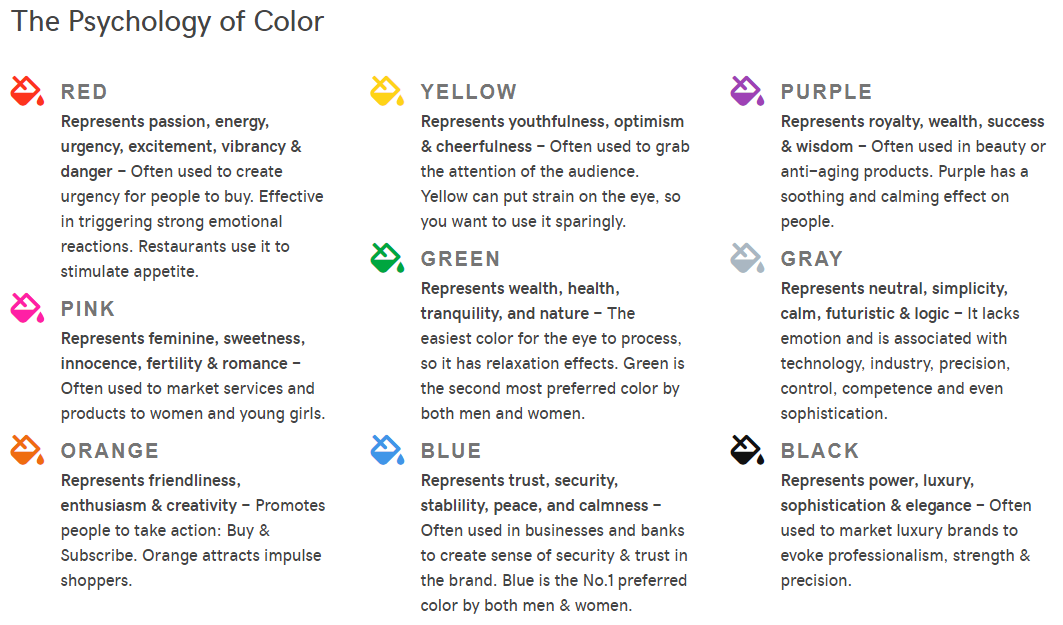
Discuss changing and provide suggestions (use Adobe Color when needed). If the customer doesn't have a logo or branding to pull a color from, help them pick one that represents the aesthetic of their business using the psychology of color section below.
In GC you can only choose ONE custom color. The GC theme builder will auto assign a light gray/white and a dark gray/black to the site, allowing ONE custom color choice to be used as a theme accent throughout the build.
Heading Font
Below is a selection of the font types included with the GC platform. Upon theme selection a default font is assigned but it can be changed to any of the other included fonts. Discuss changing from the default font or choosing one that looks similar to the font used in the customer's logo/branding - provide suggestions.
In GC you can only choose ONE font type. The list of included fonts are shown below. There's no way to import or use a font that's not on the list. The GC theme builder allows you to pick ONE font (used for headings) and then pairs it with a complementary body font which cannot be changed.
Content

Content
Worksheets | Stock Images & Videos | Additional Features

Download Worksheets
Attempt to walk the customer through the worksheet. If the customer wants to review, or doesn't have time, you can send it.
Discuss Theme Choice & Sections
Sort through GC themes to find the header/hero layout best suited to the customer. In GC, the theme basically affects the layout/appearance of the header and hero area only. The rest of the site is built using sections. The same sections are available on all sites within all themes and can be rearranged, removed, or added on as needed.
The site components affected by the theme are:
Header Includes
header has cart, search, phone, address, or all of them
Header Position
static header at top only, or sticky header - stays fixed on scroll
Header Transparency
solid header, transparent header, or opaque color overlay
Hero Cover Media
large image, video, split - 2 images, split - 1 image with solid color/text
Hero Size
is the hero area a full-width row? or is it fixed to content width
Navigation Position
is the navigation inline with the logo/cart, OR is it stacked
The section types available to be added on to any theme are:
Text:
About
Content
Privacy PolicyMedia:
Photo Gallery
Video
Audio
Widgets:
Menu / Price List
Files
HTML
Logos & Badges
PayPal Button
Zillow Reviews
Reservations
MLS/IDX Real Estate
Restaurant Ordering
Advanced:
Calendar
BlogLead Gen:
Subscribe
Social
Contact Us
Products:
Featured Products
Featured Categories
Appointments & Services
Discuss Content, Images & Media
Review images, their size and quality. Offer to help with images/videos. Offer content writing if they need it and suggest content ideas (see tips). Attempt to take the customer to the URL. If they do not have time, or want to review it themselves, feel free to send them the link.
When the business type is entered, GC auto-places industry-relevant stock images across the site which customers can choose to keep in revisions or replace with their own. Some themes allow hero videos and stock is provided for those as well. See GC themes above to find one that suits the customer's desired hero media type.
| Feature | GC Includes |
|---|---|
| Hero Video | -- videos will not work on mobile (platform limitation) |
| Hero Slideshow | -- not possible (platform limitation) |
| Slideshow Page/Section | -- will count towards image count |
| Gallery Page/Section | -- will count towards image count |
| Videos Page/Section |  -- Built in widget can include ONLY Youtube/Vimeo videos on site -- Built in widget can include ONLY Youtube/Vimeo videos on sitevideos can also be added via html embed code *autoplay only through embed code |
| File Download (non-product) | |
| Embed Additional CSS or JavaScript | -- not possible (platform limitation) |
Discuss Content Writing
Each plan has complimentary content writing up to # pages included in their plan type. If customer opts in to content writing worksheet must be completed on the phone with the customer during the consultation, not emailed to customer after call.
If the site is “out of scope” (over 10+ pages…) then you should follow the normal “out of scope” process to receive an estimated delivery date.
Leads

Lead Generation
Setting up GEM - GoDaddy Email Marketing & Subscriber List

Email Marketing
Note: Required fields on this page will show up in "Pending Items" under Content tab, but will not keep form advancing to "Content"
Grand Opening Email
To help your store launch to be as successful as possible we will be setting up your first email marketing campaign to announce your website's Grand Opening!
- Yes/No: As part of this service, you can provide up to 25 email addresses to friends and family to send this announcement to.
Would you like to provide us with this list or just send to you when completed? - If Yes: add the email list provided by customer * this file will not count towards content count
Email Subscriber List
- Yes/No: Do you have an email subscriber list that you would like us upload to your marketing account for you?
- If Yes: get the email list provided by customer in .CSV format or as an excel .XLSX document.
Email Subscribe Form
- Yes/No: As part of your build we will be including an email subscribe form on your homepage, would you like to offer a promotion to sign up?
(subscribe form feature shown in demo here https://gcdemo.godaddysites.com/subscribe) - If Yes: have customer provide Discount off total order (must be a % off), and a custom message for the sign up form.
Pulse Check:
"Do you have any questions about any of the design elements, features, or content that we just went over?"
Recap & Next Steps
Consult Recap Email:
You are to send the “after consult recap email” once consultation is complete. We should advise the customer they are getting this email, and if they need to send anything they can reply to it without changing the subject line (see tips for more info).
Moving to Build: 69 Clipping that includes the scope of the build information (navigation, features) needs to be sent with every project that is sent to build.
Questions/ Concerns & Follow-Up: You are to engage in any questions the customer may have after consultation is complete, prior to ending the call (see tips for more info).
Schedule Revisions: Set up revisions call based on build time frame if TC is collected, if not schedule a follow up.
Notes: Leave call notes in addition to intake form.
“Do you have any remaining questions before we head into the next segment of the build process?”